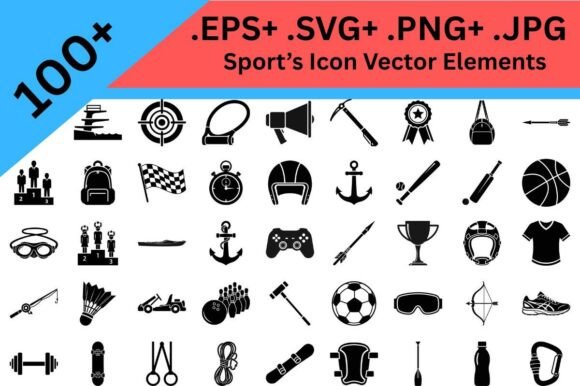
Sports Silhouette Icon Bundle: Clean, Versatile Graphics for Real-World Design Needs
Whether you're cutting vinyl for a youth soccer team’s custom water bottles or designing a sleek fitness app interface, the right visual language makes all the difference. That’s where the Sports Silhouette Icon Bundle steps in—not as a flashy, overdesigned collection, but as a thoughtfully curated set of clean black vector icons built for function, flexibility, and fast results.
What Makes This Bundle Stand Out in Practice?
At its core, the Sports Silhouette Icon Bundle delivers simplicity with purpose. Every icon is rendered in bold, high-contrast black vector format—no gradients, no shadows, no unnecessary detail. That means crisp edges at any size, whether you’re scaling a basketball icon down to 12 pixels for a mobile menu or enlarging a trophy to 18 inches for a wall decal.
This isn’t just about aesthetics. Vector scalability translates directly into time saved and fewer technical hiccups. Unlike raster images that pixelate or require multiple file versions (PNGs at different DPIs, SVGs for web, EPS for print), this bundle gives you one source file format—SVG—that works across platforms: Cricut Design Space, Silhouette Studio, Adobe Illustrator, Figma, Canva, and even basic word processors with SVG support.
More Than Just Balls and Jerseys
The Sports Silhouette Icon Bundle goes beyond the obvious. Yes, it includes classic symbols like footballs, tennis rackets, and running shoes—but it also covers the full ecosystem around athletic life:
- Equipment & Gear: Helmets, dumbbells, resistance bands, yoga mats, hiking boots, climbing carabiners, and even sports watches.
- Achievement & Identity: Trophies, medals, ribbons, podiums, numbered bibs, and championship banners.
- Environment & Activity: Trail markers, mountain silhouettes, swimming lanes, court outlines, track ovals, and outdoor gear like tents and backpacks.
- Support & Structure: Whistle icons, stopwatch hands, clipboard outlines, coaching diagrams, and even simple first-aid symbols.
This breadth matters because real-world projects rarely focus on just one sport—or even one category. A high school cross-country coach might need icons for training plans (stopwatch, route map), team identity (jersey, trophy), and wellness (water bottle, stretching pose). A print-on-demand shop creating “Trailblazer Life” apparel benefits from mixing hiking, trail, and endurance motifs seamlessly—all within the same visual language.
Designed for Creators Who Value Speed *and* Consistency
If you’ve ever spent 45 minutes searching for “clean volleyball icon no background SVG,” only to find mismatched stroke weights or inconsistent proportions across a set, you’ll appreciate how tightly edited this bundle is. Each icon shares the same line weight, corner radius, negative space ratio, and visual rhythm. That uniformity means your designs feel intentional—not pieced together.
For Cricut and Silhouette users, that consistency pays off immediately. No more adjusting cut settings per icon because some are too thin or overly detailed. The Sports Silhouette Icon Bundle is optimized for clean cuts—even on lightweight vinyl or heat-transfer material. Rounded terminals prevent snagging. Minimal internal paths reduce weeding time. And because every icon is centered and properly grouped in the vector file, importing into design software takes seconds—not minutes.
Where These Icons Actually Get Used (Beyond the Obvious)
Think beyond t-shirts and posters. Here’s where designers, coaches, and small business owners are putting the Sports Silhouette Icon Bundle to work today:
- Custom Training Apps & Digital Tools: Fitness coaches building Notion dashboards or custom workout PDFs use these icons to label sections—“Warm-up,” “Strength,” “Recovery”—without cluttering the interface.
- Youth Sports Communication: Club admins drop icons into email newsletters and Google Slides to visually reinforce practice schedules, equipment checklists, or tournament brackets.
- Gym Wall Graphics & Wayfinding: CrossFit boxes and community rec centers print large-format versions on matte vinyl for durable, non-distracting signage—think “Cardio Zone” or “Stretch Area” with matching icons.
- Educational Infographics: PE teachers illustrate anatomy, movement mechanics, or sports history timelines using consistent, recognizable symbols that don’t compete with text.
- Branded Merchandise for Niche Audiences: A women’s hiking collective uses trail, compass, and summit icons across tote bags, enamel pins, and Instagram story templates—building cohesion without needing a full logo system.
Why “Minimal” Doesn’t Mean “Generic”
Some minimal icon sets sacrifice clarity for trendiness—oversimplifying until a “cycling” icon looks identical to a “motorcycle” icon. The Sports Silhouette Icon Bundle avoids that trap by preserving essential distinguishing features: the curve of a lacrosse stick head, the double-loop of a jump rope, the segmented bars of a rowing oar. It’s minimalism with intention—not reduction for its own sake.
That attention to recognizability matters most when icons serve functional roles. On a sticker for a triathlon transition bag, you need to instantly identify “bike,” “run,” and “swim” zones—not guess based on vague shapes. In a mobile app toolbar, users shouldn’t pause to decode whether a circular shape with two lines is a discus or a frisbee. These icons pass the “glance test”: clear at small sizes, legible in grayscale, and distinct enough to stand alone.
Practical Considerations Before You Download
Before adding the Sports Silhouette Icon Bundle to your toolkit, consider these real-world factors:
- Licensing: Check whether your intended use falls under standard commercial rights—especially if you plan to sell physical products (like sublimated shirts) or embed icons into SaaS tools. Most reputable bundles include broad commercial licenses, but always verify.
- File Organization: Look for logical grouping—by sport type (team, individual, outdoor), by function (equipment, achievement, action), or by file naming conventions (e.g., “icon-trophy-gold.svg”). Well-organized files save hours over time.
- Color Flexibility: While the bundle is delivered in black vector, confirm the files are truly editable. You should be able to recolor icons instantly in Illustrator or Silhouette Studio—not forced to trace or rebuild them.
- Compatibility Notes: Some bundles include legacy formats (AI, EPS) alongside SVG. If you primarily use Cricut, prioritize SVG + DXF options. For print shops, layered PDFs or CMYK-ready EPS files add value.
Finally, ask yourself: Does this set grow with your needs? The best icon bundles aren’t static—they’re expandable. Some creators release seasonal updates (Olympics, Paralympics, new sports additions) or companion packs (sports typography, pattern overlays, mascot silhouettes). Knowing whether the Sports Silhouette Icon Bundle offers future updates—or integrates with related assets—helps ensure long-term ROI.
Final Thought: Tools Should Disappear Into Your Workflow
The most effective design resources don’t draw attention to themselves. They disappear into your process—reliable, predictable, and quietly powerful. That’s the quiet strength of the Sports Silhouette Icon Bundle. It doesn’t shout. It supports. It scales. It cuts cleanly. It communicates clearly. And whether you’re launching a new sports brand, prepping for Saturday’s tournament, or building your 100th t-shirt design, it gives you back time—the most valuable resource any creator has.